Hey!
If you follow anything around AI right now, you have probably seen a lot of protocol names. MCP for tools. A2A for agents talking to other agents. Every week there is one more acronym. 😅
Recently I came across another one: AG-UI, the Agent–User Interaction Protocol.
Honestly, my first reaction was, “Okay, another one?” But when I started reading about it, it was the first protocol in this whole list that is about my side of the product. The part where a real person is sitting in front of the screen, waiting for the agent to do something.
I am a frontend engineer at heart. So when somebody says “we built a protocol for how agents talk to the UI,” I get curious very quickly.
So here is what I learned, and why I think it actually matters.
01The problem nobody talks about
Building an AI agent demo is easy now. Building a good interface for that agent is a different story.
A simple chatbot is fine. User sends a message, model sends text back, you stream it into a bubble. Done.
But agents do much more than send text.
- They call tools, and the user wants to see what is happening while they wait.
- They run for a long time, sometimes minutes, with multiple steps in between.
- They update some data, like a document, a form, a cart, or a dashboard.
- Sometimes they need a human to say “yes, go ahead” before doing something risky.
- And sometimes they fail in the middle, and the UI still has to make sense.
Before AG-UI, every team was solving this in its own way. Your own SSE endpoint. Your own JSON format. Your own logic to figure out if a half-streamed chunk is a text message or a tool call. And if you switched your backend from one agent framework to another, there was a good chance a big part of your frontend had to be rewritten.
Every framework was speaking its own language. And the frontend was the poor translator in the middle. 🥲
02So... what is AG-UI?
AG-UI stands for Agent–User Interaction Protocol. It is an open, lightweight, event-based protocol that standardises how an AI agent backend talks to a user-facing app.
It came out of CopilotKit, from their early work with LangChain and CrewAI. They kept building the same agent-to-UI plumbing again and again, so they turned it into a common standard.
The simplest way I understood it was by putting it next to the protocols I already knew:
AG-UI vs MCP vs A2A
They are not competing with each other. An agent can use MCP to read your calendar, A2A to ask another agent for help, and AG-UI to show you what it is doing and ask for your approval. Different conversations, different protocols.
And the support is already quite big. LangGraph, CrewAI, Mastra, Pydantic AI, LlamaIndex, Agno, AG2, Google ADK, Microsoft Agent Framework, AWS Strands Agents... and there are community integrations for the Claude Agent SDK and Cloudflare Agents too.
That list surprised me. This is not one startup's side project anymore.
03AG-UI events: everything is an event
This is the part that clicked for me.
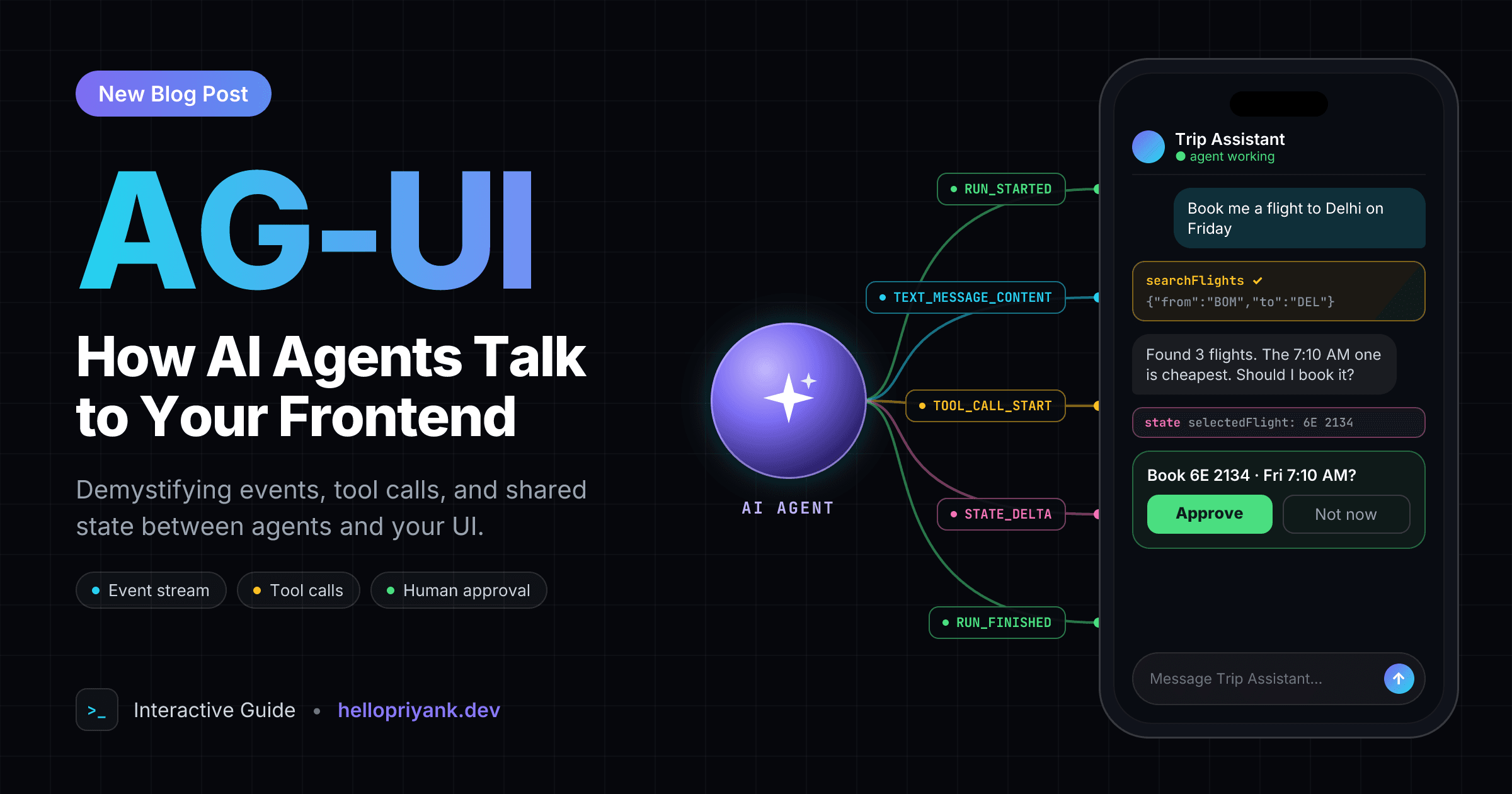
In AG-UI, the agent does not send one big response at the end. It sends a stream of small JSON events, usually over plain HTTP with Server-Sent Events. Each event has a type, and the frontend just reacts to them one by one.
The events fall into a few simple groups:
RUN_STARTED, RUN_FINISHED, RUN_ERROR, plus steps. Is the agent working, done, or broken?TEXT_MESSAGE_START, _CONTENT, _END. The streaming text you already know.TOOL_CALL_START, _ARGS, _END, _RESULT. Show what the agent is doing, while it does it.STATE_SNAPSHOT and STATE_DELTA. Shared data between agent and app, kept in sync.There are a few more too, like reasoning events for showing the agent's thinking, sub-agent events, and CUSTOM and RAW for anything app-specific. But the four groups above are the core.
Reading about events is one thing. Seeing them is better. So I made a small replay below. Press play and watch how a stream of boring JSON slowly turns into a real UI. 👇
Notice that the right side is not hardcoded. It is rebuilt from whatever events have arrived so far. That is exactly what a real AG-UI client does.
Also notice the STATE_DELTA event. It does not send the whole state again. It sends a small JSON Patch, like “replace /selectedFlight with this value.” If you have ever worked with Redux, this feels very familiar. Except now the agent can dispatch updates too. 🤯
And that last confirmBooking tool? That is a tool the agent asks the frontend to run. The app shows an approval card, the user clicks, and the answer goes back to the agent. That is human-in-the-loop, without inventing a custom format for it.
04Why AG-UI is important
From the outside, this may look like “just a JSON format.” But I think it solves some very real problems.
1. The agent stops being a black box
The worst agent experience is a spinner that says “Thinking...” for 40 seconds. Is it searching? Stuck? Did it already book something?
With tool call and step events, the UI can show actual progress. “Searching flights.” “Comparing prices.” “Waiting for your approval.” Users trust what they can see. This is not only a nice UX detail, it is the difference between people using the product or closing the tab.
2. Humans stay in control
For real products, the agent should not be allowed to send money, delete data, or email a customer without someone saying yes. AG-UI treats this as a normal part of the flow. The agent can pause, the user can approve, edit, or reject, and the run continues without losing its state.
I think this is the most important point. The future is not “AI does everything alone.” It is AI doing the boring parts, and the human making the important calls.
3. Frontend and backend can change separately
If the backend speaks AG-UI, the frontend does not care if it is LangGraph, CrewAI, Mastra, or a custom Python script. You can switch the agent framework without rebuilding the whole UI. And the same agent can power a web app, a Slack bot, or a mobile app.
This is the same reason we like REST and GraphQL. A shared contract means teams can move without stepping on each other.
4. It feels like real-time apps, which I already love
At IMVU, I worked on Live Rooms. People join, leave, become presenters, send tips. Everything there is an event, and the UI has to react to each one correctly: play the audio alert, update the role, show the success or the error state.
When I read the AG-UI spec, it felt very familiar. It is the same event-driven thinking, just applied to an agent instead of a room full of people. As a frontend engineer, that makes agents feel a lot less scary to build for.
05What AG-UI code looks like
The nice thing is that the code is not complicated. Here is a tiny Python server, adapted from the official quickstart, that streams a hello message:
In a real agent, the text deltas come from your model instead of being hardcoded. But the shape stays the same.
And on the frontend, you subscribe to the events you care about:
That is it. No custom parsing of strings. No guessing what a chunk means. If you are using React, CopilotKit gives you hooks and ready-made components on top of this. But the protocol itself does not need React. Any client that can read an event stream can use it.
06Things I am still careful about
I like it a lot, but I do not want to sound like a sales page. 😄 A few honest notes:
It is still young
The spec is still moving. For example, the old THINKING_* events were renamed to REASONING_* in version 1.0. That is normal for a new protocol, but if you are building something big, pin your versions and read the changelog.
You may not need it for a simple chatbot
If your app is one text box and one streamed answer, a protocol may be extra weight. AG-UI starts making sense when you have tools, shared state, long-running work, or approvals. That is where the custom glue code starts to hurt.
The agent is still not trusted input
Just because events come in a nice standard format does not mean you should trust them blindly. Validate state updates. Check permissions on the server before running anything important. A frontend approval button is great UX, but the backend still needs its own security checks.
It does not design the UI for you
AG-UI tells you what happened. It does not tell you how a good loading state, error state, or approval card should look. That part is still on us, the frontend and design people. Which, honestly, I am happy about. 😌
07Questions I had while learning AG-UI
These are the questions I kept asking myself in the beginning. Maybe they save you some time.
What is AG-UI?
AG-UI, the Agent–User Interaction Protocol, is an open, lightweight, event-based protocol that standardises how an AI agent backend talks to a user-facing app. The agent streams small JSON events like RUN_STARTED, TEXT_MESSAGE_CONTENT, TOOL_CALL_START and STATE_DELTA, and the frontend reacts to them.
Who created AG-UI?
AG-UI came out of CopilotKit, from their early work with LangChain and CrewAI. It is open source, and many agent frameworks now support it, including LangGraph, CrewAI, Mastra, Pydantic AI, LlamaIndex, Google ADK, Microsoft Agent Framework and AWS Strands Agents.
What is the difference between AG-UI, MCP and A2A?
They solve different conversations. MCP connects an agent to tools and data. A2A connects an agent to other agents. AG-UI connects an agent to the user, through your app. An agent can use all three at the same time.
How does AG-UI send events to the frontend?
Usually as Server-Sent Events over plain HTTP, but it is transport-agnostic, so WebSockets and other transports work too. Each event has a type, and the client rebuilds the UI from the events it has received so far.
Is AG-UI only for React or CopilotKit?
No. CopilotKit gives you React hooks and components on top of it, but any client that can read an event stream can use AG-UI. There are clients for terminals, Slack, Microsoft Teams and React Native, and SDKs in TypeScript, Python and many community languages.
Do I need AG-UI for a simple chatbot?
Probably not. If your app is one text box and one streamed answer, a protocol may be extra weight. AG-UI starts paying off when your agent calls tools, shares state with the UI, runs for a long time, or needs human approval.
08My takeaway
For the last two years, most of the AI conversation was about models. Bigger, faster, smarter.
Then it moved to agents and tools. MCP made it easy to connect agents to data. A2A made it easier for agents to work together.
But in the end, a person still has to use the thing. They need to see what is happening, trust it, correct it, and approve it. That layer was missing a standard, and AG-UI is trying to fill it.
For frontend engineers, I think this is good news. Agent products are going to need people who understand streaming, state, real-time UI, loading states, error states, and accessible design. That is our home ground.
It also connects with something I wrote about recently. If you read my post on becoming a Forward Deployed Engineer, this is exactly the kind of layer that decides whether people trust an AI product or quietly go back to the old spreadsheet.
Next on my list is building a small agent with a real approval flow on top of AG-UI, and seeing how far I can push the UI side.
The models are getting smarter. Now the interface has to catch up. And honestly... that sounds like a fun problem to work on.